On this page
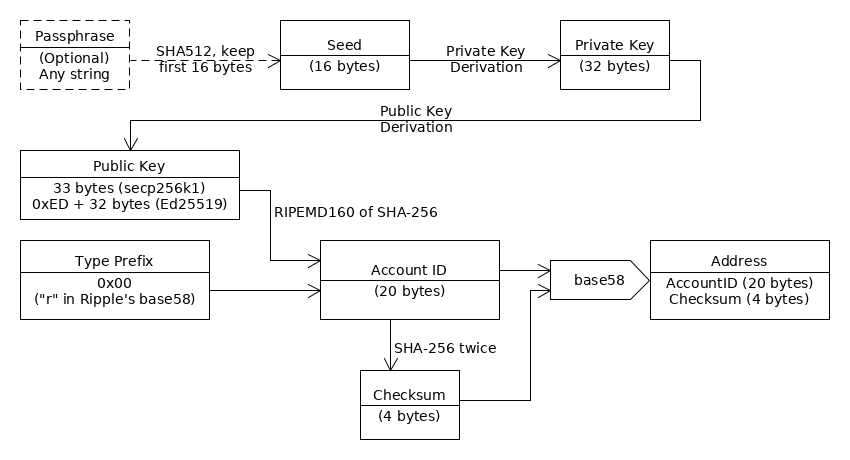
A wallet on the XRP Ledger is less a container than a keyring. Your funds are entries in the shared ledger, and the wallet holds the keys that prove they are yours and authorize changes to them.
The reserve guide covers why a new account needs XRP before it works.
Already holding XRP on an exchange? The exchange-to-wallet walkthrough is the practical route, and the scams and seed safety guide covers the one rule that matters most: the passphrase, seed and private key are secrets, and anyone who knows one has full control of the account. Everything below is the background.
What a wallet does: it signs
A crypto wallet is a way to manage your account and funds on the XRP Ledger. Non-XRP assets are not stored in the account itself. Each one lives in an accounting relationship called a trust line, which connects two parties; the trust lines guide explains them.
What the wallet adds is a signature. Digital signatures are the only way to authorize transactions in the XRP Ledger, and no privileged administrator can undo a transaction once it has applied. Only signed transactions can be submitted to the network and included in a validated ledger. So control of the keys is control of the money. Funding an account gives you no special privileges over it, and whoever holds the secret key matching the address has full control of the account and all the XRP in it.
Seed, private key and address
The cryptographic keys documentation separates secrets from public information. The passphrase, seed and private key are secrets: know any one for an account and you can make valid signatures and have full control. The public key, account ID and address are public. A public key cannot create valid signatures, so it is safe to share.
| Value | Secret or public | What it does |
|---|---|---|
| Passphrase | Secret | Gives full control if known |
| Seed | Secret | Source from which keys are generated |
| Private key | Secret | Signs transactions |
| Public key | Public | Cannot create valid signatures, so it is safe to share |
| Account ID and address | Public | Identify the account |
If someone else knows the seed or private key of your account, they can authorize any transaction the same as you could. Only use key pairs generated with devices and software you trust.
A key pair is a private key and a public key connected mathematically through key derivation. The seed sits at the start of that chain. It can be completely random, which is recommended, or derived from a passphrase, which is less secure than choosing the seed or private key at random. Seeds are 16 bytes (128 bits) long.
A passphrase is the odd one out. It is an optional input for choosing a seed, and it is less secure than choosing the seed completely at random. Rare cases justify it: in 2018 “XRPuzzler” gave away XRP to the first person to solve a puzzle, and he used the puzzle’s solution as the passphrase to the account holding the prize. Anyone who knows an address’s passphrase has effectively full control over that address.
Most XRP Ledger software never shows the private key and derives it from the seed when needed. Saving the private key instead of the seed is technically possible but rare. That is why the seed is the value to back up and protect. The account ID is the core identifier for an account or key pair and is derived from the public key. A classic address writes that account ID in base58 with a checksum, so a small typo produces an invalid address rather than a different valid one. That way a typo or a transmission error does not send money to the wrong place. Some tools show an X-address instead, which combines the account ID and a destination tag in one string with its own checksum; the destination tags guide explains the tag half.
Public keys travel with every transaction, because the network needs them to verify the signature. You might keep a public key to yourself for a while, but eventually it has to appear in a transaction so the ledger can verify the signature and process it. That is safe: it is effectively impossible to compute a matching secret key from a public key.
What to back up
The seed, and only the seed, on paper. The address and public key can be derived from it any time; the secrets cannot be recovered from them. Anyone who knows an address’s seed has effectively full control over that address, so the paper is the account. If you own an account, be very careful with its secret information. Without the secret you cannot use the account, and if someone else has it, they can take control of it. Keep it offline, which means nowhere that malicious actors can reach it and, in general, out of reach of any program that talks to the internet at large.
Custodial or non-custodial
The central choice, laid out in Crypto Wallets, is who holds the keys. In a custodial wallet, a third party holds your funds, typically in an account it manages on the ledger. In a non-custodial wallet, such as Xaman, you hold the secret keys and are ultimately responsible for the security of your account.
| Question | Custodial | Non-custodial |
|---|---|---|
| Who holds the secret keys? | A third party | You |
| Forgot your password? | You can typically have it reset | If you lose your keys, you are locked out with no recovery options |
| Day-to-day use | User-friendly for everyday payments | You can handle any transaction type without anyone restricting your options |
| Main risk | A bigger target for attackers, with immediate access to many customers’ funds | You carry the whole security burden |
Many centralized exchanges offer custodial wallets, and when you open an account with one you do not technically have an account on the ledger. Deposits to those shared accounts rely on destination tags, covered in the destination tags guide. Providers carry their own risk too, such as supply-chain attacks, where an attacker loads malicious code into a wallet through software updates or dependencies.
Hardware or software
Hardware wallets are physical devices that store your secret keys. Their main benefit is that you can disconnect them from the internet when they are not in use, which keeps the keys away from easier-to-hack computers and smartphones. Software wallets are entirely digital: easier to use, less secure, and usually richer in features. For a master key, the options are an air-gapped machine, a piece of paper in a safe, or memory.
Why a new address is not an account yet
Deriving keys and addresses is purely mathematical. For an account to have a record in the XRP Ledger, it must receive a payment of XRP that meets its reserve requirement, and until it is funded it cannot send any transactions.
The Mainnet reserve was 1 XRP base plus 0.2 XRP per owned item when checked on 2026-10-21, there to keep spam and abuse from bloating the shared ledger. The reserve guide has the details.
Master key, regular key and multi-signing
You cannot change or remove the master key pair, but you can disable it. If a malicious actor learns your master private key or seed, they have full control of the account unless the master key pair is disabled. The good practice is to keep the master key pair offline and sign day to day with a regular key pair instead.
Offline does not mean out of reach. With the master key enabled but offline, you can be reasonably certain no one can get to it over the internet, and you can still fetch it in an emergency. Only the master key pair can send an account’s very first transaction, because accounts cannot be initialized any other way. Once you disable it, you can re-enable it using a regular key pair or multi-signature. Memorizing a key has a cost: nobody else can inherit it after you die.
A regular key pair is a secondary signing key you can remove or replace at any time without changing the rest of the account. It has the same format as a master key pair, and the SetRegularKey transaction assigns or changes it. If a malicious user learns your regular private key, you can take the master key out of offline storage and use it to change or remove the regular key.
Multi-signing
Multi-signing authorizes transactions with a combination of secret keys. Any combination of methods can be enabled, but at least one must be. Multi-signing has three main uses:
- Require keys from different devices, so an attacker must compromise several machines to send transactions for you.
- Share custody of an address between several people, each holding one of the keys.
- Delegate sending power to a group who can act if you are unavailable or unable to sign normally.
A signer list can hold 1 to 32 addresses, cannot include your own address and cannot contain duplicates. Each signer has a weight, which is that signer’s authority relative to the others, and the quorum is the minimum total weight needed to authorize a transaction. For a very important account you might set the quorum to 3 with 3 participants of weight 1 each, so all of them must approve every transaction.
| Setup | Quorum | Signers and weights | Effect |
|---|---|---|---|
| Shared account | 1 | Everyone has weight 1 | One approval from any participant is enough |
| Very important account | 3 | 3 participants, weight 1 each | All must approve every transaction |
| Tiered company account | 3 | A CEO at weight 3, 3 Vice Presidents at weight 2 each, 3 Directors at weight 1 each | Approval needs the CEO, or enough weight from the other tiers |
Each signer’s entry can also carry up to 256 bits of arbitrary data, which the network ignores and applications can use. Multi-signing costs more: the fee must be at least (N+1) times the normal transaction cost, where N is the number of signatures provided. And as a safety net, an owner can add a signer list of friends. If the owner loses the private key, those friends can multi-sign a transaction to replace the regular key.
Losing keys, and addresses nobody controls
Lose your keys and you are locked out of your XRP Ledger account, with no recovery options. That applies to non-custodial wallets only; custodial providers can usually reset a forgotten password. For a non-custodial account the safeguards are the ones above: an offline master key, a replaceable regular key and, where the stakes justify it, a signer list of trusted people. A leaked secret can be used by anyone, so treat each secret as the account itself.
For some addresses, nobody has the secret key. Such an account is a blackholed account, and its XRP is lost forever.
Developers who want to generate keys in code, and to see why one seed can give two addresses in two tools, will find it in the xrpl.js guide. The other accounts guides cover reserves, tags and scams.
Questions people ask
Can I lose my XRP in a cold wallet?
Yes, if you lose the keys. With a non-custodial wallet, lost keys mean you are locked out of your account with no recovery options. Hardware wallets keep secret keys on a physical device disconnected from the internet when not in use.
Sources
- Crypto Wallets · xrpl.org · checked October 21, 2026
- Cryptographic Keys · xrpl.org · checked October 21, 2026
- Accounts · xrpl.org · checked October 21, 2026
- Multi-Signing · xrpl.org · checked October 21, 2026
- Reserves · xrpl.org · checked October 21, 2026
Image credits
- From passphrase and seed to address. Everything to the right of the private key can be shared; the seed and private key cannot. — XRP Ledger Foundation and contributors (xrpl.org), MIT License, via source

Limits and defaults can change with node releases: each source shows the day it was checked. How we check facts · Report an error.