
Tokens on the XRP Ledger do not simply land in a wallet. The receiving account has to opt in first, and the opt-in is a trust line.
What a trust line is
A trust line is a relationship between two accounts that tracks one token. Trust line tokens are the original token standard of the XRP Ledger, in contrast to Multi-Purpose Tokens. They are tracked in trust lines, which enforce the rule that you cannot cause someone else to hold a token they do not want.
The ledger records each one as a RippleState entry, a bidirectional relationship. It is a single shared balance, positive from one account’s perspective and negative from the other’s, plus a limit set by each side, which is 0 by default. Unlike XRP, trust line tokens always exist in trust lines, and all transfers move along them.
Why you need one to receive a token
Without a trust line, an account cannot receive that asset. The default limit of 0 means nothing can arrive until the holder raises it, and any account can unilaterally trust another to issue a token by sending a TrustSet with a nonzero limit.
Some transactions create the line for you: buying a token in the decentralized exchange can do it implicitly. Two accounts can have any number of trust lines between them for different currency codes, but only one shared line per currency code. XRP itself needs no trust line, which is why the guide on what the XRP Ledger is treats it separately.
How do you create a trust line for a new asset?
With a TrustSet transaction, which creates or modifies the link between two accounts. The key fields:
| Field | What it does |
|---|---|
| Currency | A three-letter ISO 4217 code such as USD, or a 160-bit hex value for a non-standard code such as RLUSD |
| Issuer | The address of the account to extend trust to |
| Limit | The most you are willing to hold; a nonzero limit opens the line |
If an account blocks incoming trust lines, a TrustSet aimed at it fails with the result code tecNO_PERMISSION.
How do trust line limits work?
The limit is the most of a token an account agrees to hold. Each side sets its own, and the default is 0. Raising it is what opens the door to that issuer’s token.
Choosing it is a choice about risk. Other people cannot push you over it: nobody can cause your account to hold more of a token than the limit on your trust line. You can go over it yourself in three cases:
- You acquire more of the token through trading.
- You decrease the limit on a trust line that has a positive balance.
- You acquire more of the token by cashing a Check.
Reserves: what does a trust line cost?
Reserve. Trust lines are ledger objects that require 0.2 XRP each, the Mainnet amount checked on 2026-10-21. To help new users get started, the reserve is waived for the first 2 trust lines you create for a new account. The rule behind it: if the account owns at most 2 items including the new line, the owner reserve counts as zero, and with 3 or more objects the full owner reserve applies.
Whether a line counts depends on its state. If any of your settings are not the default, or you hold a positive balance, the line counts as one item toward your owner reserve. The Auth flag does not decide whether a line counts. A line is deleted automatically when both sides are in the default state and the balance is 0. The reserve guide explains the base and owner amounts.
Getting tokens out of circulation
Burn them by sending them back to the issuer. Issuers can also charge a transfer fee that is deducted automatically when users transfer their tokens. Token math is decimal: trust line tokens use base-10 math with 15 digits of precision.
QualityIn and QualityOut
These are optional trust line settings that value tokens at less (or more) than face value. A stablecoin issuer that charges a 3% fee for withdrawing tokens for the equivalent off-ledger assets could use them to value those tokens at 97% of face value.
The scale is per 1,000,000,000 units: QualityIn values incoming balances at the ratio of the number you set per 1,000,000,000 units, and 0 is shorthand for face value. The ledger treats both 0 and 1000000000 as the default state for these fields. In practice you are much more likely to set a QualityOut value than a QualityIn value. The fee is separate from token transfer fees.
Read the TrustSet reference before setting a nonzero value. Its worked example uses 10,000,000 as 1% of funds remaining with the sender, which is not an obvious match for the per-1,000,000,000 scale in the same entry. Try any quality value on a test network first and look at what arrives.
Authorized trust lines
Authorized trust lines let an issuer allow-list its holders. The issuer enables the Require Auth flag on its issuing account, which is only possible while the account has no trust lines and no offers, so the decision comes before you issue anything. Allow-listing does not apply to XRP.
Setup follows a fixed pattern. The customer and the issuer each send a TrustSet, in either order. Authorization cannot be revoked once granted, and the Authorized flag cannot be changed back once it is true. The authorizing transaction must be signed by the issuing address, which increases risk exposure for that address. Never submit a secret key to a server you do not control. For issuers, one account per token type is the recommended practice, in case you need different settings.
What are rippling and No Ripple?
Rippling is the indirect movement of funds that occurs for any payment of trust line tokens, except when an issuing account exchanges tokens directly with another account. MPTs intentionally do not support rippling. Issuing accounts must allow it so holders can pay one another.
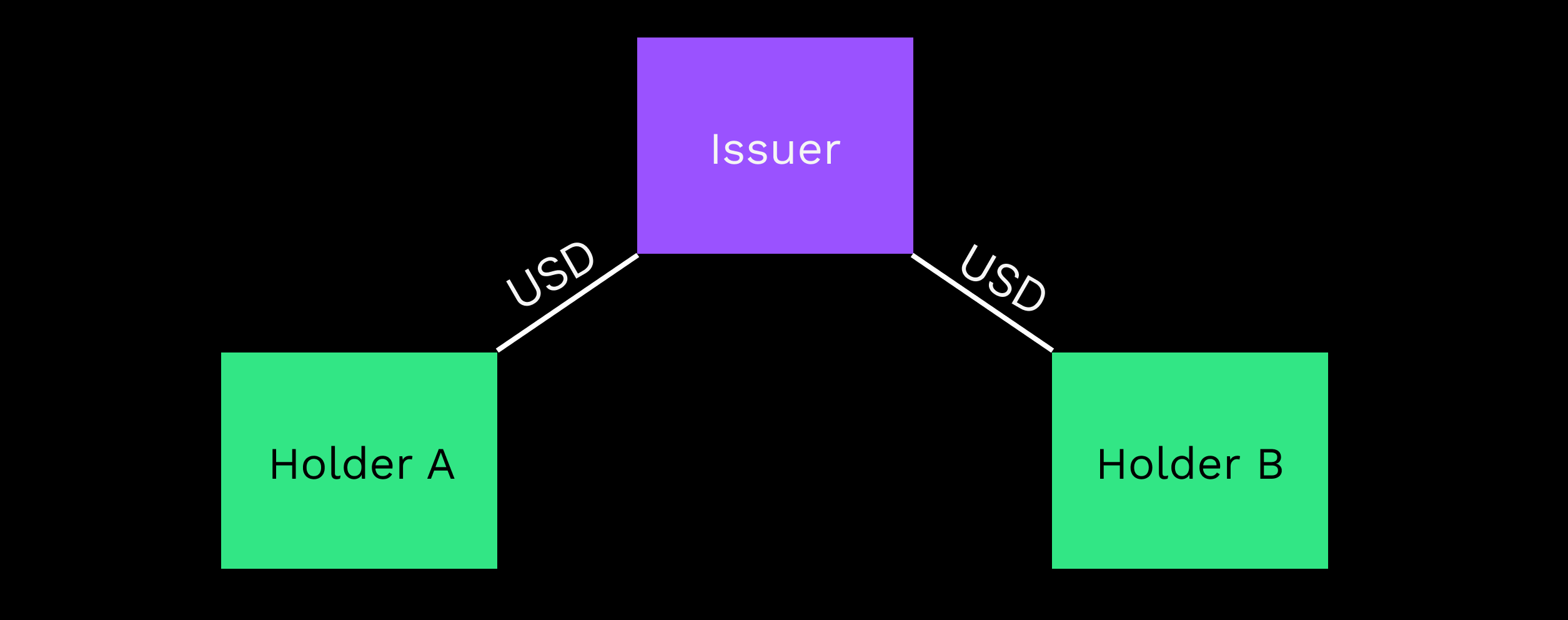
Everyone else should leave it off. Rippling can lead to exploits where balances shift unexpectedly, tokens are allocated at higher rates, and the holder loses value on a transaction they played no part in. Usually issuers should allow rippling and non-issuers should disable it, unless they use trust lines for community credit.
Two settings control this, and people mix them up:
| Setting | Where it lives | What it does |
|---|---|---|
Default Ripple (asfDefaultRipple) |
The account, set with AccountSet | Enables rippling on the account’s trust lines by default. It is false by default, and issuers must enable it for customers to send tokens to one another |
No Ripple (tfSetNoRipple, tfClearNoRipple) |
One trust line, set with TrustSet | Blocks rippling between two trust lines of the same currency if the flag is enabled on both; the clear flag allows rippling again |
Default Ripple does not affect trust lines you create, only lines others open to your account. If you change it, lines created before the change keep their existing No Ripple settings. On the ledger entry each side has its own flag, and lsfLowNoRipple means the low account has disabled rippling from the trust line. For new accounts Default Ripple is off, so No Ripple defaults to true on lines they hold.
Freezes
No one can freeze XRP in the XRP Ledger, although custodial exchanges can always freeze the funds they custody at their own discretion. Trust line tokens have four related settings:
| Setting | Effect |
|---|---|
| Individual Freeze | Freezes one counterparty, so they cannot spend tokens |
| Deep Freeze | Further freezes one counterparty, so they cannot receive those tokens either |
| Global Freeze | Freezes all counterparties |
| No Freeze | Permanently gives up the ability to freeze individual counterparties and to end a global freeze |
Either the issuer or the holder can freeze a trust line, but the effect is minimal when a holder does it. A deep freeze needs an individual freeze already in place or enacted at the same time. Global Freeze applies to all tokens issued and held by the address, so you cannot enable it for one currency code only. On a TrustSet, tfSetFreeze freezes the trust line.
The risk is the issuer
The line is not the risk. Opening one lets your account receive the token, and the limit caps what payments and other accounts can push onto it. The ledger records balances and rules, not what stands behind a token, so check who the issuer is before you opt in.
Control sits mostly on the issuer’s side. Both issuers and regular accounts can freeze trust lines, which limits how the tokens in them can be used. An issuer can turn on Require Auth so that other accounts hold its tokens only after it authorizes their trust lines. XRP itself is not subject to this allow-listing.
Before you open one
- Confirm the currency code and issuer address; both are part of the line’s identity.
- Choose a limit you are comfortable holding.
- Keep 0.2 XRP free per line beyond the first 2.
- A line with default settings and a 0 balance deletes itself.
- To lock a token for a period, read the escrow guide first.
If you came here to trade rather than hold, the exchange guide is next, and the AMM guide covers the pool that sits beside the order book. More in the token guides.
For builders: setting a trust line from code
Wallets open and close trust lines for you. This is what the underlying transaction looks like.
A TrustSet transaction
This is the example from the TrustSet reference. It sets a limit of 100 USD toward the issuer, and its Flags value of 262144 is tfClearNoRipple, which allows rippling on this line.
{
  "TransactionType": "TrustSet",
  "Account": "ra5nK24KXen9AHvsdFTKHSANinZseWnPcX",
  "Fee": "12",
  "Flags": 262144,
  "LastLedgerSequence": 8007750,
  "LimitAmount": {
    "currency": "USD",
    "issuer": "rsP3mgGb2tcYUrxiLFiHJiQXhsziegtwBc",
    "value": "100"
  },
  "Sequence": 12
}
A line back at default settings with a zero balance is deleted automatically.
Sources
- Trust Line Tokens · xrpl.org · checked October 21, 2026
- Authorized Trust Lines · xrpl.org · checked October 21, 2026
- TrustSet · xrpl.org · checked October 21, 2026
- Rippling · xrpl.org · checked October 21, 2026
- Freezes · xrpl.org · checked October 21, 2026
- AccountSet · xrpl.org · checked October 21, 2026
- RippleState · xrpl.org · checked October 21, 2026
Image credits
- Two holders, one issuer. A payment from one holder to the other moves along both trust lines. — XRP Ledger Foundation and contributors (xrpl.org), MIT License, via source

Limits and defaults can change with node releases: each source shows the day it was checked. How we check facts · Report an error.